A GPS attendance tracking system allows employees to record attendance through a mobile device using location information. For Malaysian SMEs managing home-based employees, client-site visits, or field teams, this offers an alternative to relying entirely on an office attendance terminal.
emplX GPS Attendance supports mobile check-ins and check-outs, configurable location radius settings, and offline attendance recording with synchronisation when connectivity returns. Connected with emplX’s attendance management functions, it helps HR teams organise records across different working locations.
Developed by MYWave, emplX combines attendance with broader HR and payroll capabilities. For businesses introducing flexible work arrangements, the value lies in maintaining a consistent attendance process while accommodating where employees work.
Why Flexible Teams Need a Different Attendance Process
A fixed attendance terminal can suit employees who start and finish work at one location. It becomes less practical when employees begin their day at home, travel directly to a customer, or move between work sites.
Without an appropriate process, HR may need to collect attendance through messages, spreadsheets, or individual confirmations. Records can become difficult to reconcile when employees use different methods.
A mobile attendance system provides a more consistent way to submit check-ins and check-outs. Employees record attendance through the application, while HR and supervisors review the information through the relevant workflow.
The system should reflect the company’s working arrangements: where employees may work, when they should record attendance, and how exceptions are handled.
Six Ways emplX Supports Flexible Work Attendance
1. Mobile GPS Check-In and Check-Out
Employees can clock in and out through the emplX mobile application using GPS location information.
This supports attendance recording beyond a fixed office entrance. An employee visiting a client or starting work at an approved location can use a mobile device rather than returning to the office solely to record attendance.
When connected, attendance information synchronises with emplX e-Time, supporting timely visibility for the people managing the records.
2. Online and Offline Attendance Recording
Field employees may encounter locations with limited internet connectivity. A mobile attendance process needs to accommodate those situations.
emplX supports check-ins and check-outs while offline, with the records automatically synchronised when an internet connection becomes available.
The distinction is important: employees can record attendance offline, but managers receive those updates after synchronisation. An offline record should not be described as immediately visible to the central team.
3. Location Verification and Configurable Settings
Location information gives attendance records additional context. HR can use it to review where a check-in or check-out was recorded.
emplX provides configurable radius settings. Its published features also include manual address entry and photo capture when a location cannot be detected.
During setup, confirm how these options will operate for your employees. Define which locations are acceptable, how exceptions should be explained, and who reviews them.
GPS attendance supports location verification at the point of recording. It should not be treated as proof that an employee remained at that location throughout the working day.
4. Attendance Visibility and Useful Reports
Attendance records become more useful when supervisors can review exceptions and HR can identify patterns.
emplX e-Time attendance management provides reporting options including attendance reports, time-error reports, timesheets, and attendance summaries. Its published features also include checks for possible issues such as unpaired clocking, late arrival, early departure, and incomplete hours.
These functions can help teams identify records requiring follow-up. For example, a missing check-out may need clarification before the attendance information is finalised.
Visibility depends on records being submitted and synchronised. Reports should also be interpreted alongside approved leave, working schedules, and any authorised changes.
5. Clearer Records and Stronger Accountability
A consistent attendance process makes it easier for employees and managers to understand what has been submitted and what requires attention.
Within e-Time, employees submit attendance records while supervisors and administrators retain oversight and approval authority.
This supports accountability on both sides. Employees have a defined method for recording attendance, and managers have a process for reviewing exceptions rather than relying on informal messages.
Accurate records still depend on appropriate settings, correct use, and timely review.
6. Support for Different Working Locations
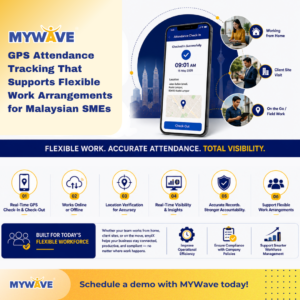
The scenarios shown in MYWave’s flexible-work illustration—working from home, client-site visits, and field work—share a common requirement: attendance recording away from a single office terminal.
| Working arrangement | How mobile attendance can help | What the company should define |
|---|---|---|
| Working from home | Employees record attendance through their mobile devices | Approved arrangements, working schedules, and recording expectations |
| Client-site visits | Attendance records include location context | Permitted locations and the process for unexpected changes |
| On-the-go or field work | Mobile recording accommodates work beyond the office | Check-in requirements, connectivity exceptions, and supervisor review |
| Hybrid work | Employees use a consistent attendance method across different workdays | Office and remote-work schedules, approvals, and exceptions |
The application supports the attendance process. Management still needs clear policies for how flexible work operates.
How GPS Attendance Fits Into an HR Attendance Tracking System
GPS attendance is the method used to capture location-related attendance information. A broader HR attendance tracking system manages how those records are reviewed, interpreted, and used.
For example:
- An employee records a mobile check-in.
- The record synchronises when connectivity is available.
- The supervisor reviews attendance and exceptions.
- HR checks the information against relevant schedules and approvals.
- Approved information supports downstream processing where configured.
This distinction matters when evaluating an HR system in Malaysia. Mobile check-ins alone may not address shift arrangements, missing records, overtime approvals, or payroll preparation.
Ask the provider to demonstrate the complete workflow using your company’s actual working patterns.
Connecting Attendance With Overtime and Payroll
Attendance is one input into payroll administration. It does not automatically establish whether additional hours should be paid as overtime.
Businesses also need applicable working schedules, company rules, and approval processes.
emplX e-Overtime supports overtime requests and supervisor approval, including the comparison of attendance information with planned overtime.
emplX e-Payroll connects with attendance, overtime, leave, and claims modules to support relevant payroll adjustments. The outcome depends on the modules, rules, and workflows configured for the organisation.
For SMEs, this connection can reduce repeated data transfer between attendance records and payroll preparation while retaining the necessary checks.
Setting Up Attendance Tracking for Your SME
Before introducing a GPS attendance app, agree on the practical details with employees and managers.
Define When Employees Should Record Attendance
Specify check-in and check-out expectations for office days, home-working days, customer visits, and field assignments.
Avoid leaving employees to interpret different requirements themselves.
Confirm Location Settings
Discuss radius settings, location-detection issues, manual entries, and photo capture with the implementation team.
Test the proposed setup in the environments where employees actually work.
Establish an Exception Process
Decide how missed check-ins, incorrect records, changed work locations, and delayed synchronisation should be reported and reviewed.
Explain who approves corrections and when outstanding records must be resolved.
Test Reports and Payroll Workflows
Use sample attendance scenarios to check what supervisors see and what HR needs to review.
If attendance information will support payroll processing, test the relevant configuration before relying on it for a live payroll run.
Better Visibility for Smarter Workforce Management
For a flexible workforce, useful attendance visibility means having organised records that managers can review and act on.
Those records can support operational efficiency, highlight recurring attendance exceptions, and help teams apply company attendance policies more consistently. They also provide information for reviewing working arrangements and scheduling needs.
Attendance data is one part of workforce management. Managers should consider it alongside workload, employee responsibilities, and actual work outcomes.
This gives the image’s message—flexible work, accurate attendance, and visibility—a practical foundation without equating attendance with productivity.
Explore GPS Attendance Tracking With MYWave
MYWave’s emplX cloud HR and payroll system connects employee management with attendance and payroll functions.
For Malaysian SMEs managing home-based employees, client-site teams, or field staff, its GPS attendance capabilities provide a way to record attendance beyond the office, including when internet access is temporarily unavailable.
👉 Ready to modernise your attendance management process?
Schedule a personalised demo with MYWave today and discover how emplX can help your business streamline attendance tracking, payroll processing, and workforce management in one powerful platform. Reach out to us at https://mywave.biz/contact-us/