Table of contents
- Understanding LHDN Batch Stamping and XML File Submission
- How to Upload LHDN Batch Stamping XML Files: Step-by-Step Process
- How to Submit the LHDN Batch Stamping Application After Assessment
- How to Check LHDN Batch Stamping Application Status
- What to Do If the LHDN Batch Stamping XML Upload Fails
- How emplX Supports Employment Contract Stamping Preparation in Malaysia
- Conclusion: Manage LHDN Batch Stamping XML Submissions with a Clear Process
For Malaysian HR departments managing multiple employment contracts, preparing and submitting stamp duty applications individually can become a time-consuming administrative process. This is particularly relevant for companies with frequent recruitment activities or large employee populations.
LHDN’s Penyeteman Berkelompok (Batch Stamping) process allows employers to prepare multiple stamping applications using an XML file for submission through the e-Duti Setem (e-DS) system.
However, successfully uploading an XML file is only one part of the process. Employers must also complete the duty assessment review, submit the application, and check its status to ensure the stamping process progresses correctly.
For businesses using emplX, MYWave’s cloud HR and payroll software, the system’s e-Stamping Export functionality provides additional support for preparing employee information related to employment contract stamping.
This guide explains how to upload LHDN batch stamping XML files in e-DS, covering the complete nine-step process from XML file preparation to application status checking, including what to do when an XML upload fails.
Understanding LHDN Batch Stamping and XML File Submission
LHDN batch stamping, known in Malay as Penyeteman Berkelompok, is a process for handling multiple stamp duty applications through a grouped submission.
Instead of preparing every application individually within the system, employers can prepare the required information in an XML file that follows LHDN’s prescribed specifications.
This approach is particularly relevant for organisations handling multiple employment contracts. However, the XML file must be correctly structured before submission, and employers must complete the necessary review and declaration stages within e-DS.
For Malaysian businesses looking to simplify the preparation of employee-related information, emplX e-Profile provides centralised employee record management, including employment contract details and statutory information.
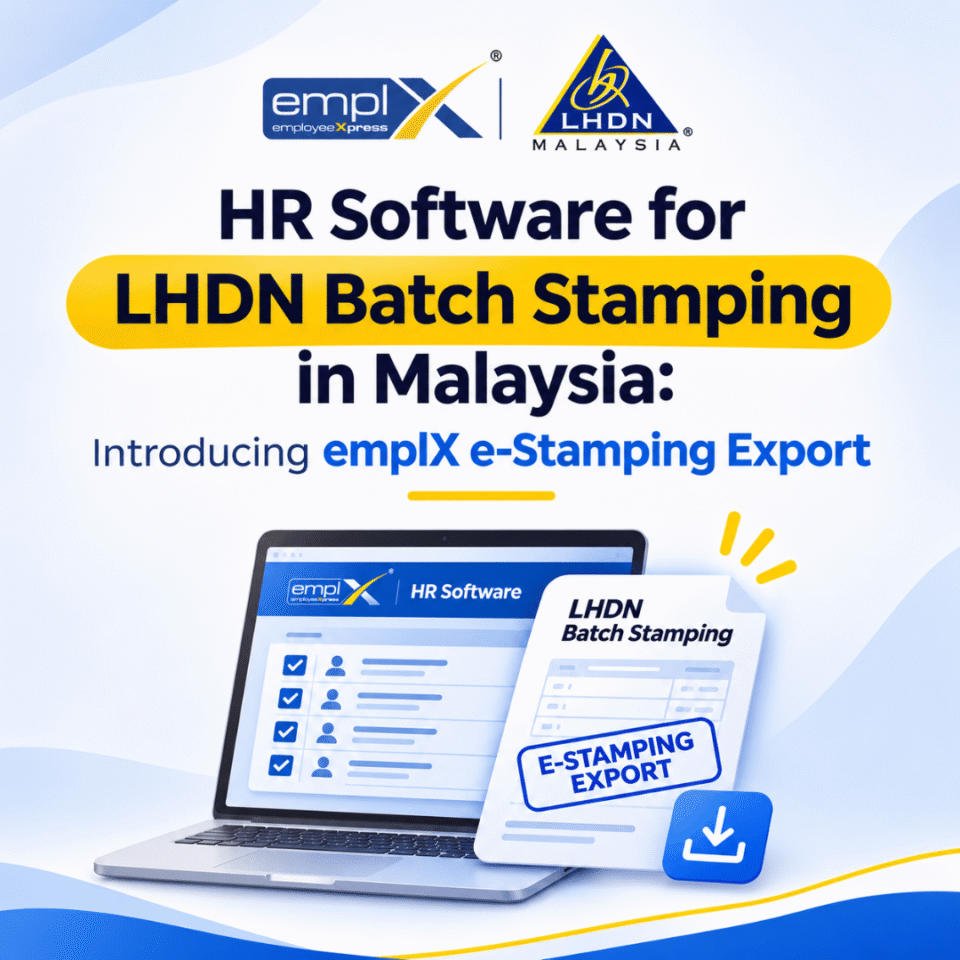
emplX also introduced an e-Stamping Export (Malaysia) feature within its Employee Profile functionality, providing a dedicated export capability associated with employment contract stamping preparation.
Employers can refer to the official emplX Employee Profile Stamping Export guide for instructions relating to this feature.
The following walkthrough focuses specifically on the subsequent XML submission process through LHDN’s e-DS system.
How to Upload LHDN Batch Stamping XML Files: Step-by-Step Process
The batch stamping workflow consists of nine steps, beginning with XML file preparation and ending with checking the submitted application.
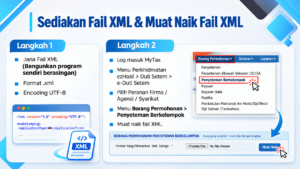
Step 1: Prepare the XML File for LHDN Batch Stamping
The first step is to generate the XML file containing the information required for the batch stamping application.
According to the LHDN procedure, the XML file is generated using a separately developed program or system. The resulting file must follow these requirements:
- File format: .xml
- Character encoding: UTF-8
- Structure: Must comply with the XML specifications required by LHDN
Preparing the file correctly is important because the e-DS system will subsequently examine its structure to determine whether it meets the required specifications.
Employers should therefore verify the information within the file before proceeding with the upload.
Step 2: Log In to MyTax and Upload the XML File
Once the XML file has been prepared, access the MyTax portal and navigate to the e-Duti Setem system.
Follow this sequence:
- Log in to MyTax.
- Navigate to Perkhidmatan ezHasil > Duti Setem > e-Duti Setem.
- Select the relevant role: Firma / Agensi / Syarikat.
- Open Borang Permohonan > Penyeteman Berkelompok.
- Choose the prepared XML file and click Muat Naik.
The system provides a dedicated upload section under Borang Permohonan Penyeteman Berkelompok, where the permitted file format is XML.
At this stage, the XML file has been uploaded for processing. The application has not yet completed the subsequent duty assessment review and formal submission stages.
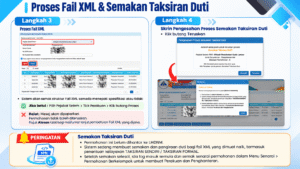
Step 3: Process the XML File and Verify Its Structure
After uploading the XML file, the e-DS system checks whether its structure complies with the required specifications.
If the XML file is accepted, the uploaded application records will be displayed for further processing.
You must then complete the following actions:
- Select the appropriate Pejabat Setem / PKH.
- Tick the declaration checkbox, Perakuan.
- Click the Proses button.
If the XML file contains structural errors, an error message will be displayed, and the application cannot proceed.
Users should refer to the Alasan section for further information about the errors that need to be corrected.
It is important to resolve these issues before proceeding rather than attempting to submit a file that does not comply with the system’s specifications.
Step 4: Confirm the Semakan Taksiran Duti Process
After clicking Proses, the system displays the Skrin Pengesahan Proses Semakan Taksiran Duti.
This confirmation screen provides information about the application, including the selected stamp office, type of stamping and number of applications.
Review the details and click Teruskan to proceed.
The system will then begin checking and calculating the stamp duty for the XML file that was uploaded. This includes determining the application’s eligibility for Taksiran Sendiri or Taksiran Formal.
Important: The application has not yet been submitted to LHDNM at this stage.
The system is performing the duty assessment review. Once this process is complete, users must log in again and navigate to:
Senarai > Permohonan Berkelompok
From there, they can proceed with the required declaration and submission.
This distinction is particularly important for HR teams managing large numbers of employment contracts. Uploading an XML file and completing the duty assessment review should not be mistaken for successfully submitting the application.
How to Submit the LHDN Batch Stamping Application After Assessment
After the duty assessment review has been completed, the next stage is to formally submit the batch stamping application.
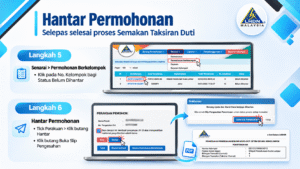
Step 5: Locate the Application Under Permohonan Berkelompok
Log in to e-DS again and navigate to:
Senarai > Permohonan Berkelompok
The system will display the list of grouped stamping applications.
Find the relevant application with the status Belum Dihantar, then click its No. Kelompok.
This opens the grouped application so you can proceed with the formal submission.
Step 6: Complete the Declaration and Submit the Application
Once the relevant grouped application has been opened, proceed to the Perakuan Pemohon section.
Follow these steps:
- Tick the Perakuan checkbox to confirm the declaration.
- Click the Hantar button.
- Once the submission is successful, click Buka Slip Pengesahan.
The system will display a confirmation indicating that the application has been submitted successfully.
The Slip Pengesahan Penerimaan provides confirmation of receipt of the grouped stamp duty application.
The confirmation slip is an important record for employers handling multiple contract stamping applications.
However, receiving confirmation of submission does not necessarily mean that every application has completed the duty assessment or payment process.
Employers should continue checking the application status through the system.
How to Check LHDN Batch Stamping Application Status
After submitting the application, users can return to the grouped application list to review the status of the submitted records.
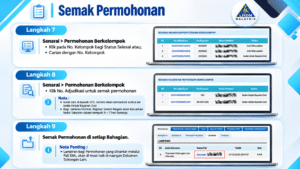
Step 7: Search for the Completed Batch Stamping Application
Navigate to:
Senarai > Permohonan Berkelompok
You can locate the relevant application by clicking the No. Kelompok for an application with the status Selesai, or by searching for the application using its No. Kelompok.
This allows users to access the records associated with the grouped application.
Step 8: Review the Application Using No. Adjudikasi
Once the grouped application has been located, click the relevant No. Adjudikasi to review the individual application.
The subsequent assessment process depends on the type of assessment.
For instruments under STS (Sistem Taksir Sendiri), the system will update the status to Sedia Untuk Bayaran Duti.
For Taksiran Formal, the procedure indicates that the State Stamp Office will issue a Notis Taksiran within 5–7 working days.
Users should check the relevant status before proceeding with subsequent actions.
Step 9: Review the Application Details and Supporting Documents
The final step is to review the application information across the available sections.
Within the application, users can inspect the relevant details and supporting documents to ensure that the information has been recorded correctly.
An important point highlighted in the LHDN procedure concerns attachments submitted through XML files.
Attachments for applications submitted through XML files will be uploaded under the “Dokumen Sokongan Lain” section.
Users should therefore check this section when reviewing supporting documents associated with their stamping applications.
For companies processing multiple employment contracts, maintaining a clear record of application statuses, adjudication numbers and supporting documents can help HR teams keep track of stamping-related administrative work.
What to Do If the LHDN Batch Stamping XML Upload Fails
An XML upload may fail if the file does not comply with the specifications required by the e-DS system.
When this happens, the system will display an error message and provide additional information under Alasan.
Instead of attempting repeated uploads without changes, users should review the stated errors and correct the XML file accordingly.
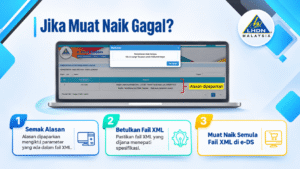
1. Review the Error Details Under Alasan
Check the Alasan section to identify the reasons the XML file was rejected.
The error messages are displayed according to the parameters contained in the XML file.
For example, the system may identify a field that contains an invalid date format or information that does not comply with the expected data format.
2. Correct the XML File
Once the errors have been identified, make the necessary corrections to the generated XML file.
Ensure that the file complies with the required specifications before attempting another upload.
3. Upload the Corrected XML File Again
After correcting the XML file, return to the e-DS system and upload the revised file through the Penyeteman Berkelompok application process.
The system will then perform the relevant checks again.
Reviewing the specific error messages helps users identify which information needs to be corrected, rather than unnecessarily modifying sections of the XML file that are already valid.
How emplX Supports Employment Contract Stamping Preparation in Malaysia
For organisations handling employment contracts regularly, one of the challenges is managing the information needed before beginning the stamping submission process.
Employee records, employment details, and contract information are often maintained across different documents or systems. As the workforce grows, keeping this information organised becomes increasingly important.
With emplX’s e-Profile employee management system, Malaysian businesses can manage employee information, including employment contract details and statutory records, through a centralised HR platform.
MYWave also introduced the e-Stamping Export (Malaysia) feature within emplX’s Employee Profile functionality.
This provides employers with a dedicated stamping-related export capability within their HR system.
For businesses already using emplX’s cloud-based HRMS solution, the feature supports incorporating employment contract stamping preparation into the wider employee administration workflow.
It is important to distinguish this capability from the LHDN submission process explained above. The emplX feature supports stamping-related export preparation, while the formal XML upload, assessment review, application submission, and status checking are performed through LHDN’s e-DS system.
For more information about the emplX functionality, refer to the Employee Profile Stamping Export user guide.
Conclusion: Manage LHDN Batch Stamping XML Submissions with a Clear Process
Uploading XML files for LHDN batch stamping requires more than preparing a file and clicking the upload button.
Employers must follow the complete sequence, from XML file preparation and structural validation to duty assessment review, application submission and status checking.
Understanding these stages helps HR teams avoid overlooking important steps, particularly the requirement to complete Perakuan and Penghantaran after the duty assessment review.
For Malaysian businesses managing larger employee populations or frequent recruitment activities, having well-organised employee records can also make stamping-related preparation more manageable.
With its e-Stamping Export functionality and comprehensive cloud HR management capabilities, emplX provides Malaysian employers with technology that supports employee administration alongside local HR requirements.
Developed by MYWave, emplX forms part of a broader HR, payroll, and workforce management ecosystem designed to support businesses ranging from growing SMEs to established enterprises.
Looking for an HR system that supports employment contract stamping preparation in Malaysia?
Explore MYWave’s emplX cloud HRMS solution or get in touch with MYWave to learn how emplX can support your organisation’s HR and payroll administration.
👉 Schedule a demo with us now!
 For more information, reach out to us at: https://mywave.biz/contact-us/
 Or, through our email at: enquiry@mywave.biz